

预处理管道#
管道在机器学习工作流程中正变得越来越流行。本质上,管道是一系列相互连接的数据处理步骤,其中一个步骤的输出是下一个步骤的输入。它们对于以下方面非常有用:
自动化复杂的工作流程,
提高效率,
减少数据处理和分析中的错误,以及
简化模型持久化和部署。
chemotools 中的所有预处理技术都与 scikit-learn 兼容,并可在管道中使用。作为一个示例,我们将研究希望将以下预处理技术应用于光谱的情况:
范围截取
线性校正
Savitzky-Golay 导数
均值中心化(标准缩放器)
PLS 回归
传统流程#
在传统流程中,需要将每个预处理技术分别应用于光谱,如下图所示:
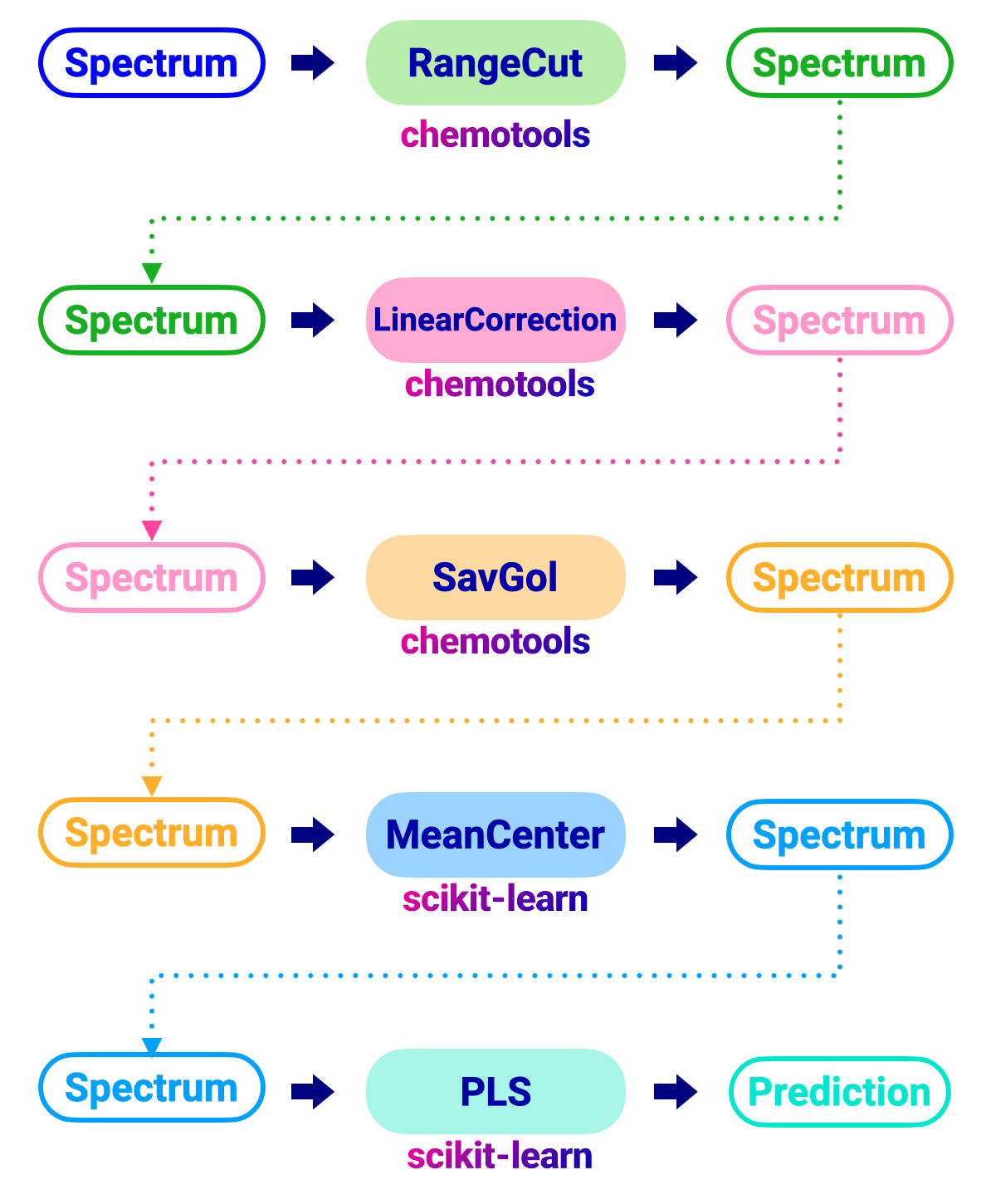
执行此工作流程的代码如下所示:
from chemotools.feature_selection import RangeCut
from chemotools.baseline import LinearCorrection
from chemotools.derivative import SavitzkyGolay
from sklearn.cross_decomposition import PLSRegression
from sklearn.preprocessing import StandardScaler

# Range Cut
# Define the Range Cut
range_cut = RangeCut(start=950, end=1550, wavenumbers=wavenumbers)

# Fit and apply Range Cut
spectra_cut = range_cut.fit_transform(spectra)

# Linear Correction
# Define the Linear Correction
linear_correction = LinearCorrection()

# Fit and apply Linear Correction
spectra_corrected = linear_correction.fit_transform(spectra_cut)

# Savitzky-Golay
# Define the Savitzky-Golay
savitzky_golay = SavitzkyGolay(window_size=21, polynomial_order=2, derivate_order=1)

# Fit and apply Savitzky-Golay
spectra_derivate = savitzky_golay.fit_transform(spectra_corrected)

# Mean Centering (Standard Scaler)
# Define the Standard Scaler
standard_scaler = StandardScaler(with_mean=True, with_std=False)

# Fit and apply Standard Scaler
spectra_centered = standard_scaler.fit_transform(spectra_derivate)

# PLS regression
# Define the PLS regression
pls = PLSRegression(n_components=2, scale=False)

# Fit the model
pls.fit(spectra_centered, reference)

# Apply model to make predictions
prediction = pls.predict(spectra_centered)
这是一个繁琐且容易出错的工作流程,特别是当预处理步骤数量增加时。此外,持久化模型并将其部署到生产环境并不简单,因为每个预处理步骤都需要单独持久化和部署。
管道流程#
在管道流程中,我们可以将所有预处理步骤组合到单个对象中。这简化了工作流程并降低了错误风险。下图显示了与上述相同的工作流程,但使用了管道:

执行管道的代码概览如下图所示:
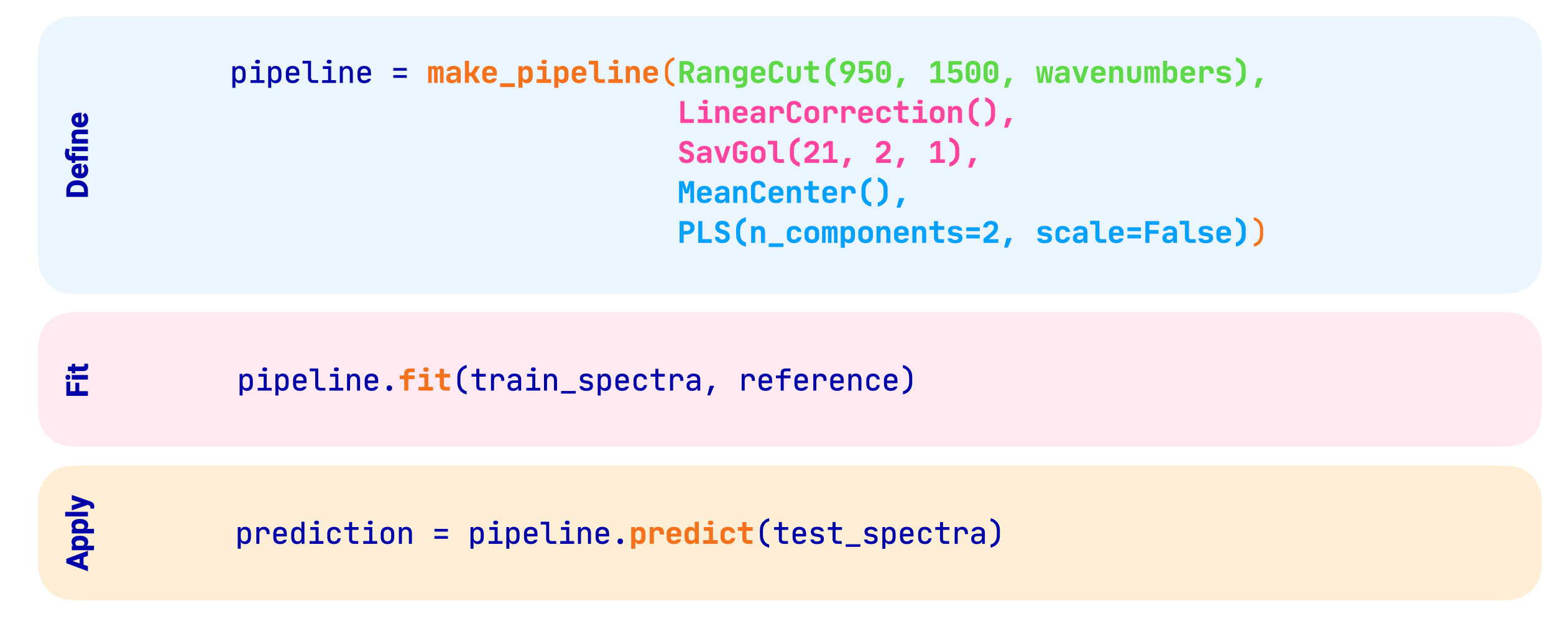
执行管道的代码如下所示:
from chemotools.feature_selection import RangeCut
from chemotools.baseline import LinearCorrection
from chemotools.derivative import SavitzkyGolay
from sklearn.cross_decomposition import PLSRegression
from sklearn.pipeline import make_pipeline
from sklearn.preprocessing import StandardScaler

# Define the pipeline
pipeline = make_pipeline(
    RangeCut(start=950, end=1550, wavenumbers=wavenumbers),
    LinearCorrection(),
    SavitzkyGolay(window_size=21, polynomial_order=2, derivate_order=1),
    StandardScaler(with_mean=True, with_std=False),
    PLSRegression(n_components=2, scale=False)
)

# Fit the model
pipeline.fit(spectra, reference)

# Apply model to make predictions
prediction = pipeline.predict(spectra)
现在可以可视化管道以及应用于光谱的不同预处理步骤。
Pipeline(steps=[('rangecut', RangeCut(end=1550, start=950)),
                ('linearcorrection', LinearCorrection()),
                ('savitzkygolay',
                 SavitzkyGolay(polynomial_order=2, window_size=21)),
                ('standardscaler', StandardScaler(with_std=False)),
                ('plsregression', PLSRegression(scale=False))])
In a Jupyter environment, please rerun this cell to show the HTML representation or trust the notebook. On GitHub, the HTML representation is unable to render, please try loading this page with nbviewer.org.
Pipeline(steps=[('rangecut', RangeCut(end=1550, start=950)),
                ('linearcorrection', LinearCorrection()),
                ('savitzkygolay',
                 SavitzkyGolay(polynomial_order=2, window_size=21)),
                ('standardscaler', StandardScaler(with_std=False)),
('plsregression', PLSRegression(scale=False))])RangeCut(end=1550, start=950)
LinearCorrection()
SavitzkyGolay(polynomial_order=2, window_size=21)
StandardScaler(with_std=False)
PLSRegression(scale=False)
备注
请注意,在传统工作流程中,不同的预处理对象必须单独持久化。在管道工作流程中,整个管道可以持久化并部署到生产环境。有关更多信息,请参阅 持久化您的模型 部分。